
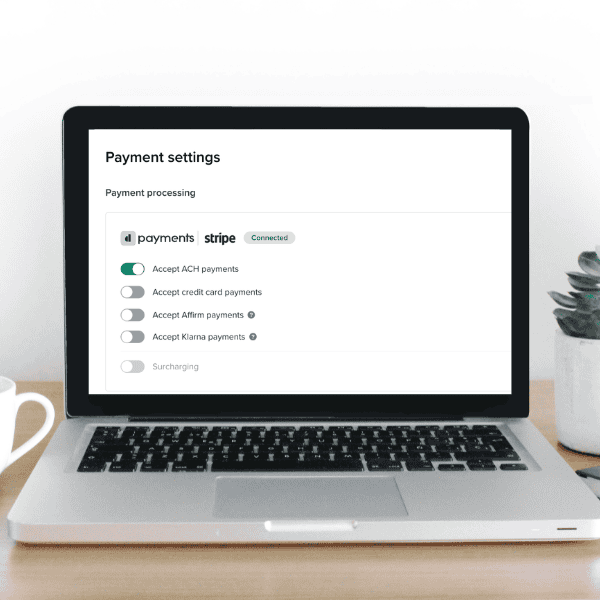
How to Accept ACH Bank Transfers in Dubsado
There’s nothing quite like the sting of watching Stripe skim 3% off the top of your hard-earned invoice. That tiny line item on every payout adds up fast…and kind of ruins the whole “woohoo, paid!” moment.
But here’s some news that will ease the sting:
Dubsado finally supports ACH bank transfers.
Translation? You have a built-in way to cut down on payment processing fees and keep more money where it belongs—in your business. And if you’re sending big-ticket invoices or running recurring payments, that tiny switch could mean hundreds of dollars back in your pocket.
Every. Single. Month.
Sure, it’s not the flashiest update Dubsado has ever made (looking at you, Dubsado 3.0), but it makes a huge difference in your bottom line.
So let’s get into it: what ACH payments are, how they stack up against Stripe, when to use them (and when not to), plus the biggest mistakes I see when folks DIY their payment setups in Dubsado.
And don’t forget to learn about other areas where your client experience system could be siphoning money, right here!
What Are ACH Payments And How Exactly Do They Work?
ACH stands for Automated Clearing House—an electronic network for U.S. bank transfers that lets clients pay directly from bank accounts. No credit cards. No middlemen. Just money moving from their account into yours.
The catch? ACH isn’t instant. Payments can take a few days to clear.
Not as much of a dopamine hit as a “paid instantly” notification, but keeping an extra $80 on a single invoice? That’s worth the wait.
Why Dubsado ACH Payments Matter for Your Business
-
- Stay inside Dubsado. No more Stripe-only invoices or messy workarounds.
- Keep more money in your pocket. Especially on big-ticket projects where 3% fees hurt.
- Make clients happy. Some people prefer bank transfers, and now they don’t have to ask for special arrangements.
- Streamline your systems. Payment plans, reminders, and invoices all work together in one CRM.
- Look pro. Seamless payments = smooth client experience = clients actually want to come back for round two.
Let’s Talk Money: Stripe vs. ACH Fees Comparison
The truth? Stripe loves your invoices almost as much as you do…because they take a 3% bite every time you get paid.
But ACH processing fees are just 0.8% and cap out at $5 per transaction.
That means if you send a $3,000 invoice:
- Stripe fee = about $87
- ACH fee = $5
- Savings = $82 on one invoice
Now imagine that on every project or every retainer payment. That’s hundreds, sometimes thousands, back in your business over the course of a year.
Of course, no payment method is perfect.
If an ACH payment fails, you’ll get hit with a $4 fee. Disputes? Those are $15. But stack that against handing Stripe a cut of every single invoice forever, and ACH comes out on top.
Bottom line: ACH saves you money. But before you start dreaming about everything you’ll do with those extra dollars, let’s cover when ACH is a no-brainer—and when to skip it.
(Want to learn about Dubsado’s other payment processing options? Read this blog!)
When to Use ACH And When to Skip It
ACH isn’t the answer to every single invoice situation. In some cases, it’s a total win. In others? A straightforward card payment will serve you better.
When ACH makes sense:
- You’re U.S.-based and working with U.S. clients (ACH doesn’t play internationally).
- You send big invoices. Paying $5 flat instead of $87 on a $3K invoice? That math does itself.
- You’ve got recurring payment plans with clients you trust to pay on time.
When to think twice (or skip completely):
- You need cash fast. ACH takes 3–5 business days to land, while Stripe offers instant payouts…at a cost.
- You work with international clients. ACH is U.S. only, so you’ll still need Stripe or PayPal in your back pocket.
- You’re worried about flaky payers. Failed ACH transactions come with a $4 fee, and disputes are $15.
Think of ACH as your “high-trust, high-ticket” option. For everything else? Credit cards still have their place.
Common Payment Setup Mistakes I See
The truth is, setting up ACH is as simple as clicking a button. Literally. That’s not where mistakes get made.
Most of the problems I see in Dubsado aren’t about choosing the wrong method—it’s how people set them up.
One common slip? Offering payment plans but not linking them properly to your invoices. You promised your client “three easy payments,” but they got a single lump sum invoice. Eeek!
Another? Reminder triggers firing out of order, or not at all. Suddenly, your client is paying late, but not because they’re dodging you…they just never got the nudge.
And then there’s the classic DIY detour: skipping Dubsado’s payment flow altogether. It feels simple in the moment but scrambles your automations and makes bookkeeping a nightmare.
So yeah, chances are the tech isn’t out to get you. But your system? Not set up strategically to actually get you paid.
Setting Up ACH Payments In Dubsado
When it’s set up right, ACH is a win-win.
You keep more of your money instead of watching it drip out in fees. Your clients get flexible, professional options without awkward “umm, so how do I pay you?” conversations. And your whole payment process feels like the well-oiled system it should be—not a patchwork of guesswork and crossed fingers.
But if that setup (and I mean the whole setup, not just the ACH button click) feels like a lot to figure out on your own…that’s where I come in.
Because getting paid is only the beginning. If the rest of your Dubsado is messy, broken, or stressing you out, then you’re still leaving money, time, and client trust on the table. So let me build out the whole system for you.
Payment plans that don’t glitch, workflows that flow, and a client experience that feels intentional instead of improvised.
All done in one, VIP Week.